Geometry Dash Lite
- 4.4
- Rating
- 500.00M
- Installs
- Free
- Price
 Analysis by App-foxy
I went into Geometry Dash Lite expecting a simple reflex game, and that is exactly where its appeal begins. It looks minimal, but playing well demands attention, timing, memory, and a willingness to repeat the same short section until your hands finally understand it. My overall view is clear: this is one of the better choices for quick arcade sessions if you enjoy difficult challenges, rhythmic movement, and gradual improvement, but it is a poor fit if you want a relaxed game that lets you make progress without frequent failure.
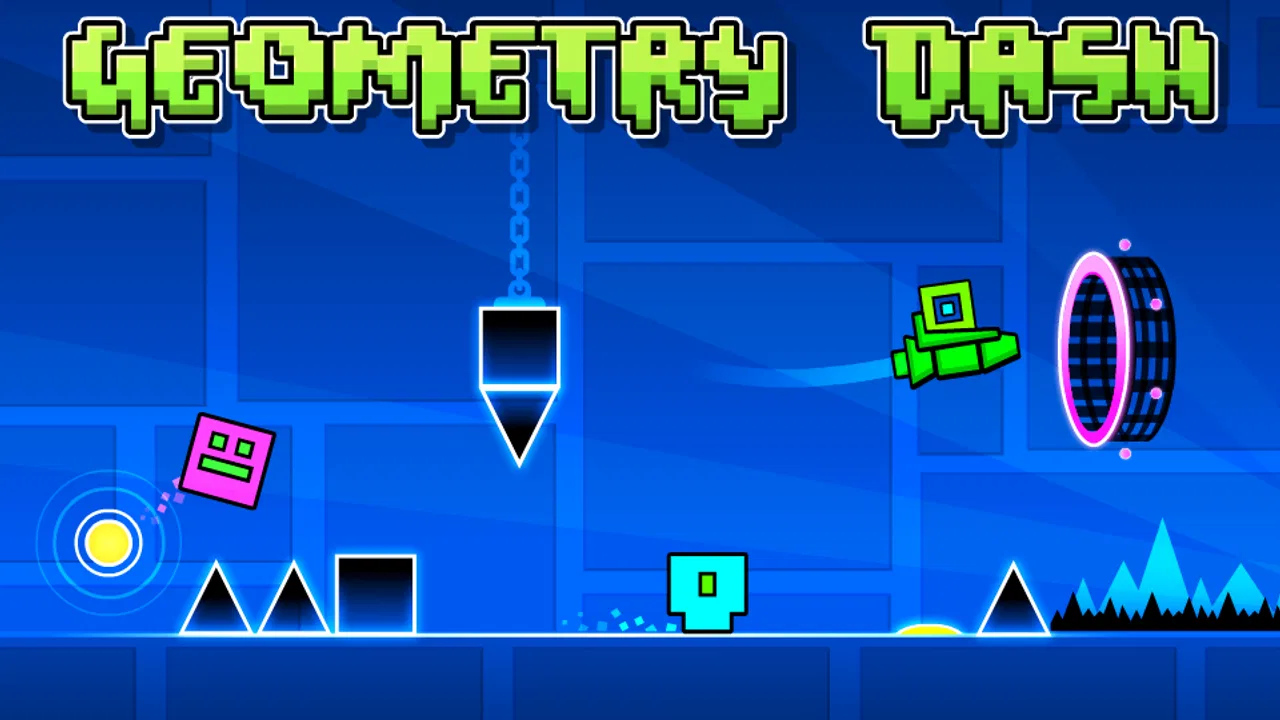
Created by RobTop Games, this free arcade game has remained recognizable since its release on September 15, 2013. Its central idea is easy to understand: guide a moving character through hazards while matching jumps and other actions to a strongly timed course. The presentation is colorful and energetic, yet the real attraction is the tight relationship between what I hear, what I see, and when I tap. That combination gives each attempt a surprisingly physical feeling, even though the controls are extremely limited.
Why the simple controls create such a demanding game
The first thing I noticed is how little the game needs from the player. In the basic platforming sections, a tap controls a jump, while holding or releasing at the right moment changes how the character behaves in sections built around flight or other movement patterns. There is no complicated button layout to learn. The challenge comes from making the correct input at exactly the right time, often while the screen is moving quickly and the next obstacle is already approaching.
In-Depth Coverage of Geometry Dash Lite
That simplicity makes the game easy to start but not easy to master. A new player can understand the objective within seconds, yet a single late tap can end an otherwise successful run. I like this design because mistakes are usually readable. When I fail, I can often identify whether I reacted too slowly, jumped too early, or entered a sequence without remembering its rhythm. The game rarely feels as though I lost because I had not learned a long list of controls.
The visual design supports that learning process. Hazards, platforms, and changes in movement are presented with strong contrast and a steady flow of color. The screen can become busy, but the important objects are generally placed so that I can learn their relationship through repetition. The music is not merely background decoration; it helps establish the pace of a section. When I stop treating each obstacle as an isolated surprise and start hearing the pattern, difficult passages become more manageable.
The most important strength is the connection between rhythm and muscle memory. I often made progress not by consciously calculating every jump, but by remembering a short sequence and letting the timing become familiar. This is also why the game can feel so satisfying after a frustrating session. A successful attempt is evidence that my timing improved, not that the game suddenly became easier.
Learning through repetition instead of guessing
One useful habit is to divide a difficult course into small landmarks. I pay attention to a particular spike arrangement, a change in movement, or a visual transition, then treat the next few seconds as one practice unit. This is more effective than thinking about an entire level as a single challenge. Once one section feels reliable, I connect it to the next section and gradually build a longer run.
That approach also explains why the game works well in short sessions. I can play for a few minutes while waiting for an appointment, but I still have a meaningful goal: improve one jump, remember one transition, or pass a point that stopped me earlier. A short session does not require a complete victory to feel useful. For me, that is a better fit for mobile play than games that demand a long uninterrupted commitment before anything important happens.
There is a practical trade-off, however. The same repetition that makes improvement rewarding can become tiring. If I keep attempting a section without changing my approach, the game turns into a loop of frustration. Taking a break, lowering the volume if the soundtrack becomes overwhelming, or returning later with a fresh sense of timing is often more productive than forcing another dozen attempts.
What the free Lite edition does well
The free price makes it easy to test whether this particular style of arcade challenge suits you. I do not need to commit money before discovering whether repeated failure feels motivating or irritating. That matters here because the game’s personality is strong: it is not trying to be a gentle introduction to platforming. It asks for concentration almost immediately and expects the player to accept that progress will come through practice.
For a free mobile game, its identity is unusually focused. It does not bury the main challenge under a complicated interface or a long narrative setup. I can open it, start an attempt, and understand what I am supposed to improve. That directness is one reason it has reached more than 500 million installs and an average rating of 4.4 from around 7.7 million ratings. Those figures do not guarantee that every player will enjoy it, but they do reflect how broadly the core formula has connected with mobile players.
The Lite edition is best understood as a way to experience the essential Geometry Dash style rather than as a complete replacement for every other game in the series. If you are curious about the movement, rhythm, and difficulty, it gives you a useful starting point without requiring a purchase. If you already know that you want the broadest possible collection of content and customization, you may eventually find the free edition limiting and prefer to investigate the fuller paid experience separately.
I also appreciate that the game is rated Everyone 10+, which matches the nature of the challenge. The pressure comes from timing and failure, not from realistic violence or mature subject matter. Parents should still know that a child who dislikes repetition may find the difficulty upsetting, while a child who enjoys mastering patterns may become deeply engaged. The age label describes the content, but it does not predict whether the emotional experience will be calm or intense.
You May Also Like

 AliExpress - Shopping App
AliExpress Makes Global Shopping Feel Personal, but Shoppers Bear the Risk
AliExpress turns a global marketplace into a pocket-sized discovery engine. Its reach is useful, its shopping loop compelling, and its trade-offs easy to miss.

 Lords Mobile: Kingdom Wars
Lords Mobile Is a Kingdom-Building Routine, Not a Quick Match
A case-by-case verdict on the building, battles, device demands, and social commitments that make Lords Mobile rewarding for some players and exhausting for others.

 PDF Scanner app - TapScanner
TapScanner Makes Paperwork Easier to Capture, Check, and Share
TapScanner makes scanning with a phone feel less like a rescue operation and more like a dependable step in getting work done. Its capture tools are useful, though not flawless.

 Block Blast!
Block Blast! Shows How Much a Puzzle Game Can Leave Out
A quiet grid game shows why puzzle players increasingly value instant clarity, repeatable skill and low-pressure play—and where the genre still needs to catch up.

 Family Space
Family Space Review: A Shared Routine That Makes Family Life Easier
A parenting app earns its place not by adding more noise, but by making everyday coordination easier. Family Space gets that balance mostly right.

 1Weather Forecasts & Radar
1Weather Forecasts & Radar Makes the Daily Check Worthwhile
A good forecast does more than predict rain. This week's pick turns changing conditions into a clear, practical reason to check before you step outside.
More From Our News Desk
View All News


The weakness is not the difficulty alone
My main criticism is that the game can make failure feel repetitive before it makes improvement feel rewarding. When a late mistake sends me back to the beginning of a sequence, I have to replay familiar sections before reaching the part I actually want to practice. That structure gives a successful run more value, but it also creates friction. Players who prefer immediate checkpoints, forgiving retries, or steady story progression may find the design unnecessarily demanding.
The rhythm-based presentation can create another problem. The music helps me anticipate movement, yet it can also make the experience feel more intense during repeated attempts. Some players will enjoy that pressure; others may want a quieter arcade game where visual timing is enough. I would not recommend this as a background game for multitasking. It rewards full attention, and casual tapping while watching something else is likely to produce more irritation than progress.
There is also a difference between understanding a level and executing it. I can know exactly what should happen and still fail because my timing is slightly off. That gap is central to the game’s design, but it may be mistaken for unfairness during an early session. In my experience, the best response is to watch the movement carefully and identify the earliest point where the run went wrong. Blaming the final obstacle usually hides the real timing mistake several seconds earlier.
Players using an older device should pay attention to the minimum requirement of Android 5.0. The game is designed for mobile hardware, but responsive timing matters more here than it would in a slow puzzle game. If input feels delayed or performance is inconsistent, even a well-practiced sequence can become difficult for reasons unrelated to skill. I would test the game in the conditions where I normally play it, especially if I plan to rely on sound and precise taps.
Small habits that make difficult runs more manageable
My first practical tip is to treat sound and visuals as two separate timing aids. When I can hear the beat clearly, I use it to anticipate the next input; when the music becomes distracting, I focus on the character’s position and the spacing of obstacles. Switching between those signals helps prevent one missed beat from ruining my concentration. The game is rhythm-based, but I do not have to depend on rhythm alone.
Second, I avoid changing my tapping style randomly after a failure. If I tap earlier on one attempt, later on the next, and then hold for an uncertain duration, I learn very little. I prefer to make one deliberate adjustment and observe the result. This turns repeated attempts into a simple experiment rather than a string of guesses. It is a small change, but it makes the difficulty feel more understandable.
Third, I use short improvement targets instead of demanding a complete finish every time. Passing one obstacle group consistently is a real milestone, even if the full course remains out of reach. This is especially useful for younger players or anyone who tends to become discouraged by a low completion percentage. The game rewards patience, but patience is easier to maintain when progress is measured by new territory and cleaner execution.
A fourth insight is that the game is better for deliberate sessions than for emotional ones. If I start tapping faster because I am annoyed, my timing usually gets worse. Pausing for a moment after several failed attempts helps reset my attention. That may sound obvious, but it is particularly relevant here because the controls are so sensitive: frustration does not merely affect mood; it directly changes the quality of the input.
Who should play it, and who should choose something else
I would recommend this game to players who enjoy arcade challenges that can be learned through repetition. It is a strong choice for someone who likes rhythm games but wants more direct control over movement, or for a platforming fan who enjoys mastering fixed patterns rather than exploring large worlds. It also suits people who want a game that can be played in short bursts while still offering a long-term skill curve.
It is particularly good for players who enjoy sharing personal goals with themselves: reaching a new section, surviving a difficult transition, or completing a sequence that once seemed impossible. The satisfaction is private and mechanical rather than story-driven. I do not play it to discover characters or build a world; I play it to make my hands more accurate than they were during the previous attempt.
I would advise skipping it if you want a relaxing game with generous mistakes, open-ended exploration, or a sense of constant forward movement. A slower puzzle game may be better when you are tired, and a conventional endless runner may suit you more if you prefer reacting to changing situations rather than memorizing demanding sequences. Geometry Dash Lite is also not ideal for someone who dislikes restarting familiar sections. That restart loop is part of its identity, not a minor inconvenience that disappears after a few minutes.
Compared with ordinary arcade alternatives, this game stands out through its precision and rhythm. Many endless runners focus on quick reactions to an unpredictable path, while this experience asks me to learn a designed sequence and execute it accurately. Traditional platformers often give the player more freedom to stop, explore, or approach an obstacle from different angles. Here, the course controls the pace, and my job is to fit my actions into it. That narrower structure is a strength for mastery but a weakness for experimentation.
Device expectations and long-term appeal
The current version is 2.2.144, and the game remains easy to understand even if I only want a brief introduction to its style. I would still make sure my device meets the Android 5.0 minimum and that I can play with enough attention to notice timing cues. A larger screen may make visual details easier to read, while headphones can make the beat more useful, although the game remains fundamentally about touch accuracy rather than expensive equipment.
Its long-term appeal depends on how I respond to mastery. There is no need to play for hours at once. In fact, I think the game is healthier as a routine of focused attempts followed by breaks. A player who enjoys gradual improvement can return repeatedly, while someone seeking a quick sense of completion may lose interest once the initial novelty fades. The free entry point helps because I can discover that preference without paying first.
The large audience and roughly 495 thousand written reviews show that the game has generated substantial discussion and continued attention, but I would not use popularity as a substitute for personal fit. Its control style is too specific for that. Some people will find the timing clean and addictive; others will experience the same precision as unforgiving. The right question is not whether it is popular, but whether repeated practice feels rewarding to you.
My verdict after putting the challenge through its paces
Geometry Dash Lite succeeds because it turns a tiny control system into a serious test of timing. The music, visual cues, and fixed hazards work together to create a clear learning loop: attempt, fail, identify the mistake, adjust, and try again. I value that honesty. The game does not pretend that progress is effortless, and it does not need a complicated feature list to keep the core challenge interesting.
Its limitations are equally clear. Replaying familiar sections can wear me down, the intensity is not ideal for relaxed play, and knowing the correct action does not guarantee that my fingers will perform it. Those are meaningful barriers, especially for players who prefer forgiving arcade games or varied exploration. I would not recommend downloading it simply because it is free; I would recommend it if the idea of mastering precise, rhythm-guided movement sounds enjoyable.
For me, the best way to approach it is as a compact training ground for patience and timing. Play in focused bursts, use the soundtrack or visual spacing as a deliberate guide, and measure progress by the sections you can now handle rather than by every failed attempt. If that mindset appeals to you, this free arcade game is easy to recommend. If you want comfort, variety, or effortless progress, choose another style of mobile game instead.
FAQs for Geometry Dash Lite
01What is Geometry Dash Lite and how does it differ from the full version?
Geometry Dash Lite is a free version of the popular rhythm-based platformer game, Geometry Dash. While it offers a similar gameplay experience with challenging levels and vibrant graphics, it includes fewer levels compared to the full version. The Lite version is a great way to try out the game before deciding to purchase the complete version, which has additional levels and features.
02Does Geometry Dash Lite require an internet connection to play?
No, Geometry Dash Lite does not require an internet connection to play. It is an offline game, allowing players to enjoy the rhythm-based challenges without needing Wi-Fi or mobile data. However, an internet connection might be necessary for downloading updates or accessing certain online features, like leaderboards.
03Are there in-app purchases or ads in Geometry Dash Lite?
Yes, Geometry Dash Lite contains ads since it is a free app. The ads help support the developers. There are no in-app purchases in the Lite version itself, but there is an option to purchase the full version of Geometry Dash from within the app, which offers more levels and features without ads.
04Can I customize my character in Geometry Dash Lite?
Yes, players can customize their character in Geometry Dash Lite. The game offers various options to change the appearance of your icon, such as colors and different shapes. While the customization options are limited compared to the full version, they still allow for some personalization to enhance the gaming experience.
05Is Geometry Dash Lite suitable for all age groups?
Geometry Dash Lite is generally suitable for all age groups, offering a fun and challenging experience for players. However, the game requires precise timing and quick reflexes, which might be difficult for very young children. It is rated for users aged 4 and up, making it appropriate for most players while providing a good challenge for older audiences as well.
Pros
- Highly addictive gameplay.
- Simple
- intuitive controls.
- Vibrant graphics and design.
- Challenging levels increase skills.
- Engaging soundtrack enhances experience.
Cons
- Limited levels in Lite version.
- No checkpoints in levels.
- Can be frustratingly difficult.
- Ads can be intrusive.
- No level editor in Lite version.

Geometry Dash Lite
Gallery